
Losing Files, a lot of files
You would think that after I got the Acer easyStore Home Server, my files are at least safe. Well, they are from a hardware point of view, but not from stupidity point of view.
Yesterday, I realized I lost a lot of files: 7 years worth of photos. The Acer easyStore Home Server did not fail me. I did. So here is what happened.
Every time after coming back from taking photos, I plug in the media card into the card reader connected to my iMac, Image Capture automatically copies all the photos into a folder on my desktop. Then Hazel automatically organizes the photos into a folder structure for me. Hazel looks at the file type (JPG, CR2 or AVI), separates them into 3 main media type folders, then within each media type folders, Hazel further organizes the photos into “year > month > day” folder structure. So I have a nice tree structure to manage my media.
This same file structure is also set up on the file share on my Home Server. The idea is that when I copy my JPG folder from my iMac to the Home Server’s file share location, I will have the new photos appended to my file share. Then I can delete the photos on my iMac so that I don’t have to keep duplicated files.
A few nights ago, I was up late finishing some financial calculation for myself. At the end of the night, I thought I should at least back up my photos to the Home Server before turning off my iMac. I was quite sleepy at the time and when I dragged and dropped the folder over to the file share, OSX prompted me to click on something. I thought I read what it was and clicked a button, the file copying started. A few minutes later it was done and I was off to bed.
Last night, I found out what happened and I could not believe it. OSX replaced my JPG folder in the file share with the JPG folder from my iMac instead of appending to it. And when I found out in disbelieve that my JPG folder in the file share only contains 2009 > 08 > 22 to 2009 > 08 > 25, I was almost going to drink a lot of liquor to sleep off the bad dream.
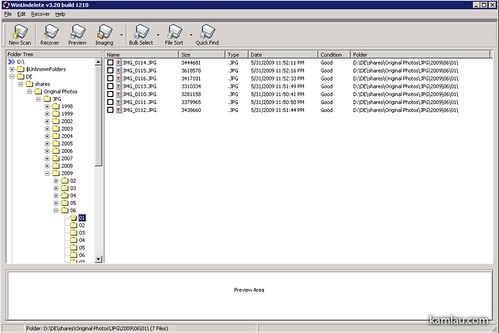
Today, I scrambled to try to find a solution. Looked over some undelete programs and try to see if any can salvage deleted files on my Home Server’s file share. So I found WinUndelete. They have a version that you can run directly off a USB key so that you don’t have to install it to your drive and having your deleted files potentially overwritten. One problem is that WinUndelete cannot recognize file share UNC paths. However, in Home Server, you can access your files under the D: location. So I let WinUndelete scan D: for JPG files and it found the folders that I accidentally deleted.
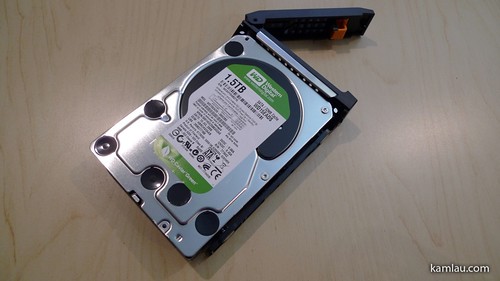
But where can I restore these files to? I cannot restore them back to D: as it could overwrite the files that have not yet been recovered. Well, quickest solution is get another hard drive. So I got a 1.5TB Western Digital Caviar Green drive for restoring photos. I added it to my Home Server’s empty slot but did not add it to the pool of Home Server storage. Instead I formatted it and assigned it to E: so that I can use it like a normal drive for WinUndelete to restore deleted files to.
After the recovery, I salvaged 22GB of AVIs (364 files), 7GB of CR2’s (353 files) and 240GB of JPGs (107,000 files). The only files I couldn’t retrieve was the files in July and August 2009. I have no idea why those did not work but my wife has a good copy of them in her notebook. (I am glad I upgraded her hard drive to a much bigger drive.)
Now it is time to think about online backup strategy. I read Scott Hanselman’s online backup article a couple years ago but I never did anything about it. Do any of you have an online backup strategy?


Good to hear that recovery went relatively well. It be a real shame otherwise. I admittedly only recently started backing up at the beginning of this year when my HDD turn 4 years. Photos, portfolio, and some music are burned onto CD/DVD. Also copied on external HD, copied additionally to a portable HD, and vital files on 2x 16GB flash drives. I feel OK.
I used to use SyncToy to backup files to external HDs and also keeping a copy of the older photos on DVDs. Since I started using the home server, I have not been doing that at all. So it is my fault for not keeping a good copy somewhere else….
Hey,
Just found your blog (good stuff!) and just purchased a home server. As for your backups, you got lucky! Not sure about your space, but why not use eternal drives to backup your home server? I have folder duplication on and back up the server to two external drives, one of which I keep off-site. Even with this method I’m paranoid about loosing the data. Like you, I have photos that I cannot afford to loose!
Spencer.
.-= Spencer´s last blog ..Laura and Levi =-.
Hi Spencer, I agree with you. I have been using a SATA drive to do my backup of the Shares now. With most of my drives attached to the eSATA enclosure, I have 2 drive bays available on the home server itself. That is where I put my backup drives and run backups once every 1 to 2 weeks. I am still not satisfied with how the Home Server handles files and occasionally I still have “file conflicts” and I have to delete the file from the Share and recover the file from my backup. I think their software replication mechanism is flawed.
Concerning backup strategy, I put a SCSI-card in the PCI-Slot and attached a LTO2 tape unit to it. Since I converted WHS to linux, I have no recommandations for backup utilities (on linux I’m used to use “tar”), but since WHS is based on win2003, NT-Backup should be available, which also handles tapes through removable media services.
Why I’m using tapes? I’m using tapes since 1990 and never had problems. Tapes are well suited for real off-line storage (i.e. put a spare copy in your mothers home, if your own home burns away…). Tapes (at least LTO’s) are relative rigid compared to external harddrives.
Mülly
Hi Mülly, thanks for sharing your backup thoughts. I have started using Linux with my Acer easyStore e340 hardware. LTO seems to have a 1.5TB limit at the moment, any thoughts about how to back up more data without using more than 1 tape?
Hi Cam,
the size of the tape cardriges does not matter, since backup software should care of distributing or appending the data over multiple cardriges. In Win2003 this is f.ex. handled (more or less) by NTBackup and removable storage manager.
Under unix you have tar, with can handle splitted archives already since aeons (tar stands for “tape archive”). However you can also use one of the many backup suites available (f.e. bacula).
In my special case I have two sets of tapes (10 tapes each = ~2GB) for full backup, which I do monthly, than some tapes for incremental backups, which I do weekly or after some “important” updates to my data.
My H340 is configured in RAID5 (software RAID, mdraid). So I hope, weekly backup does the job.
Concerning LTO4 and greater, you must be aware, that these thingys need very high sustained transfer rates (up to 320kBytes/s) to run smoothly, which outperforms “normal” homeservers (even the stuff I have to deal with on my job), so I consider staying on LTO3 or less which are also quite inexpansive nowadays.
Mülly
Corrigendum: Data rate should read 320MBytes/s…